



Google AI Mode: what it means for your website
Google AI Mode explained: how it builds answers from many sub-searches, what that means for clicks and what you should change on your website now.
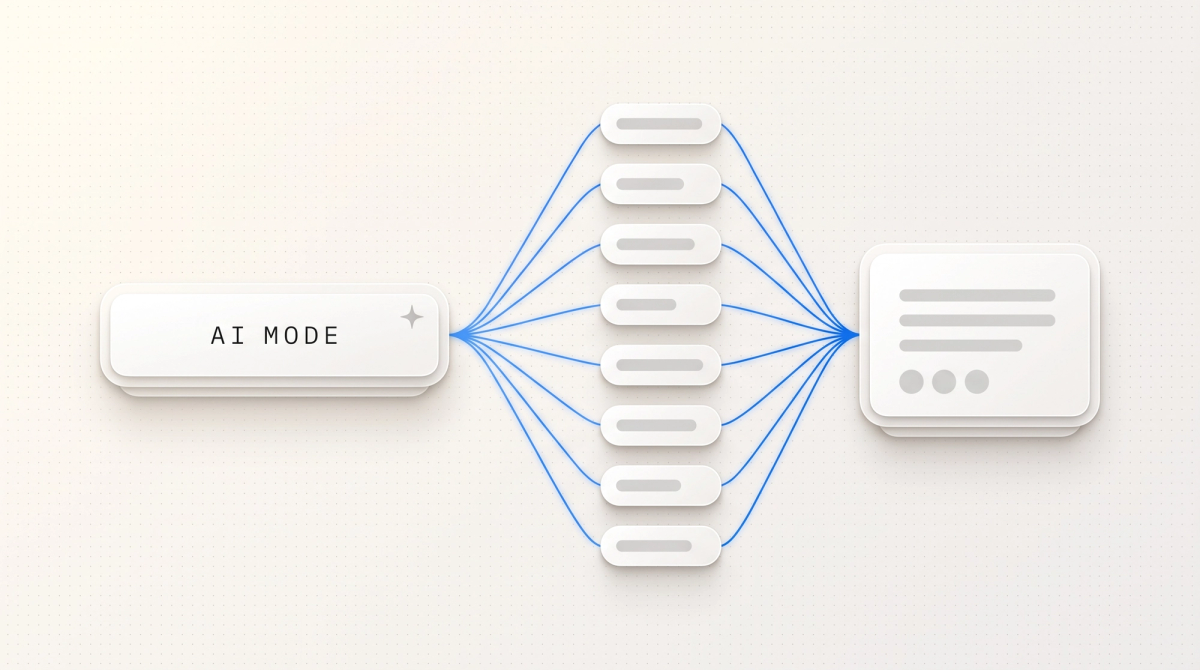
Google AI Mode is a separate search view in which a Gemini model splits your question into many sub-searches and turns the results into a written answer with source links, instead of showing you a list of results. It has been available in Germany since 8 October 2025, and according to Google's May 2026 figures more than one billion people use it every month worldwide (as of October 2026).
For companies, the goal shifts. A good position on Google is no longer enough, your page has to show up as a source inside the answer. We first cover the user questions, then the part for companies: how answers are built, what happens to traffic, what to do on your website and how to measure it.
Key takeaways
- AI Mode has been available in Germany since 8 October 2025, in German, French and Italian.
- Since May 2026 you can jump from any AI Overview straight into AI Mode with a follow-up question, but the classic results page is still the default view.
- In a field experiment with 1,100 US users (March 2026), clicks to external websites dropped by 18.8 percentage points in AI Mode.
- Since 31 August 2026, Search Console gives every website a dedicated report for AI features, but only with impressions, no clicks and no queries.
- According to Google's May 2026 guide, AI Mode needs neither llms.txt, special schema nor chopped-up content.
- Our call: indexable, citable pages first, targeted work on AI visibility second.
The short answer
AI Mode is Google's chat-style search. You ask a question, Google runs many related searches in parallel in the background (query fan-out), reads the pages it finds in its index and writes an answer with linked sources. You can ask follow-up questions and the context carries over.
For your website this means you are no longer judged on one keyword alone, but on whether your page answers one of the many sub-questions most clearly. Google itself says the fundamentals of SEO apply: indexable pages, clean technology and content with real substance.
There is no reason to panic, and no reason to wait either. Clicks from AI answers are getting rarer, and if you are missing from the answer, nobody sees you at all. So the goal is to be named, not just to rank.
What is Google AI Mode?
AI Mode is a search view that shows one detailed AI answer instead of ten links. Google's help center describes it as its most powerful AI search, running on a customised version of the Gemini models. Gemini is Google's large language model (LLM), an AI that understands and writes text. In May 2026 Google made Gemini 3.5 Flash the default model in AI Mode, and since then it has been testing newer models first as an option for paying subscribers.
AI Mode understands text, voice, images and files. According to Google, people there ask questions two to three times longer than typical searches. Comparisons, planning and questions that used to take several searches are typical. When Google is not confident enough in an answer, AI Mode shows a list of web links instead, as its help page explains.
How do you open AI Mode?
There is nothing to switch on. Google lists three ways in: the address google.com/ai, the "AI Mode" tab on the results page, or the button on the home screen of the Google app. Since May 2026 a follow-up question in an AI Overview also takes you straight into AI Mode. To keep a history of past conversations you need to be signed in with search history turned on.
How is AI Mode different from AI Overviews?
AI Overviews are short AI summaries above the normal results that only appear for some searches. AI Mode is a separate view where the answer is the centre of the page and the conversation continues. Since May 2026 the line has blurred, because Google connects both features through follow-up questions. The table shows the state as of October 2026.

How is AI Mode different from AI Overviews?
| Feature | Classic search | AI Overviews | AI Mode |
|---|---|---|---|
| Available in Germany since | always the default | 26 March 2025 | 8 October 2025 |
| Where it appears | results page | top of the results page, only for some searches | own tab, google.com/ai, Google app |
| What you see | list of links | short summary with links below | detailed answer with source links |
| Follow-up questions | new search needed | entry into AI Mode via follow-up | in the conversation, context carries over |
| Inputs | text, voice, image | same as classic search | text, voice, image, files |
| Measurement in Search Console | clicks, impressions, position, queries | "Generative AI" report with impressions | the same report, combined with AI Overviews |
| Excluding your website | noindex | "Search generative AI" setting | the same setting |
| Goal for your company | top position | being linked as a source | being named and linked in the answer |
For an overview of all AI search tools from ChatGPT to Perplexity, see our article on AI search engines. This article is only about Google's AI Mode.
How does AI Mode build its answers?
The core is called query fan-out: the model turns your question into many related queries, sends them to the Google index in parallel and merges the results into one answer. Google's guide gives an example: "how to fix a lawn full of weeds" becomes searches for herbicides, for weed removal without chemicals and for prevention, among others.
Google does not disclose how many sub-searches there are. The US agency Seer Interactive analysed 501 prompts in November 2025 through the Gemini 3 API with Google Search as the source. Result: an average of 10.7 sub-searches per prompt, compared with 6.01 for Gemini 2.5. 95 percent of these sub-searches had no measurable search volume, and just over a quarter contained a brand name. That does not prove AI Mode works exactly like the API. The direction is still clear.
AI Mode pulls its sources through Google's normal ranking and quality systems. Google calls this grounding: the answer is anchored to specific pages from the index, which then appear as links. If you are missing from the index or do not allow a snippet, you cannot be cited. How generative systems choose sources in general is covered in our article on generative engine optimization.

What does AI Mode mean for clicks and traffic?
Fewer clicks per search, that is what the reliable data shows so far. The strongest source on AI Mode is a preregistered field experiment by researchers at the University of Pennsylvania and Northeastern University, published in August 2026 as a preprint (not yet peer reviewed). 1,100 US users searched for one week in March 2026 with a browser extension. Those who used AI Mode only clicked through to external websites 18.8 percentage points less often than with normal Google Search.
For AI Overviews, Pew Research Center analysed the browsing of 900 US adults in March 2025, 68,879 Google searches in total. With an AI summary, users clicked a classic result in 8 percent of visits, without one in 15 percent. They clicked a link inside the summary itself in 1 percent of visits. We found no comparable study for Germany.
Google counters that clicks from AI features are higher quality because visitors stay longer. For B2B we find that plausible: whoever still clicks after an answer with sources usually has a concrete need. Fewer visits, but with more intent. So the metric to watch is the enquiry, not the session.
What should you change on your website?
The good news: there is no secret AI technique. Google's guide on visibility in AI features says plainly that optimising for generative AI search is "still SEO". What shifts is the weighting. We recommend these five steps in this order.
Answer sub-questions on your strongest pages
Think about which follow-up questions a buyer asks (cost, timeline, requirements, alternatives) and answer them on the matching service page in their own paragraphs. No separate page per sub-question: Google treats mass-producing pages for fan-out variants as spam. More in our article on keyword research.
Stay indexable and eligible for a snippet
A page has to be in Google's index and allowed to show a snippet, the short text excerpt in search, otherwise it will not appear in any AI answer. A forgotten nosnippet or noindex (directives that block the excerpt or inclusion in search) is enough to drop out. The checks are in our guide to technical SEO.
Deliver content as finished HTML
Google can process JavaScript but itself calls SEO for such websites more complex. Other AI crawlers, the programs AI providers use to read pages, did not run any JavaScript at all according to a Vercel analysis from late 2024. If the server delivers the page fully built, everyone sees the same text. That is how in-sync.io runs, on Next.js with Sanity.
Make your company a clear entity
For Google, an entity is a clearly identifiable thing, such as a company with a name, location and services. Keep these details identical on your website, your Google Business Profile and directories so the model does not confuse you with another firm.
Become worth citing
Google's guide favours content that is not interchangeable: your own numbers, real project experience, clear price ranges, a recognisable opinion. Genuine mentions in trade media help, bought or staged mentions do not, according to Google.
Google is just as clear about what you can skip for Google Search. That frees budget for the steps above.
- An llms.txt file: Google Search does not use it, though it can still make sense for other services, see our article on llms.txt.
- Splitting text into small chunks: Google recognises several topics on one page by itself.
- Rewriting content just for AI: the systems understand synonyms, you do not need every phrasing.
- Special schema markup, meaning machine-readable extra data in the code: not needed for AI features, still useful for rich results (enhanced listings, for example with stars or FAQs).
AI Mode draws on Google's index. ChatGPT, Perplexity and Copilot source their answers differently, and partly other signals count there. How that work differs from classic SEO is covered in our comparison SEO vs. GEO, and writing tips for direct answers are in our article on answer engine optimization.
How do you measure AI Mode in Search Console?
Since 31 August 2026 every website in Google Search Console has the Generative AI performance report. Google announced it on 3 June 2026 and first showed it to a test group. It counts how often links to your website were shown in AI Overviews and AI Mode, which are the impressions.
- You see impressions by page, country, device and date, down to the hour.
- Clicks, click-through rate, position and queries are missing from this report.
- AI Overviews and AI Mode are counted together, the help page mentions no split.
- Clicks from AI Mode sit in the normal performance report under "Web", but you cannot filter them out there.
That is not enough to tell whether you are named in answers and with what content. For that you need regular checks with fixed prompts, as described in our article on measuring AI visibility. Since August 2026 Search Console settings also include the "Search generative AI" switch. It excludes your website from AI Overviews, AI Mode and the AI features in Discover. You then get no impressions and no traffic from them. According to Google it does not affect rankings in the rest of Search. For almost every company that wants to be found, it is the wrong move.
Do you need to act now?
It depends on how your customers search and how solid your fundamentals are. Our rule of thumb: the more explanation and money your offer involves, the more decision-makers research with long questions, and that is exactly what AI Mode is built for.
Yes, if
You should start in the coming weeks if at least one of these applies.
- Buyers compare your service before purchasing, for example software, consulting or industrial solutions.
- The Generative AI report shows many impressions for you, but your organic traffic is falling.
- Your website only renders content in the browser or has not had a technical check in years.
- Competitors are named in AI answers on your core topics and you are not.
Not yet, if
You can hold off on AI Mode work if one of these applies, but not on the fundamentals.
- Your business relies almost entirely on local walk-in customers and your Google Business Profile.
- Your website is not indexed yet or has basic SEO errors, then start with an SEO audit.
- You sell through personal referrals and search barely matters for new customers.
- A relaunch is coming in the next few months anyway, so build these points straight into it.
Our take
No reason to panic, but a reason to reset your goals. AI Mode does not change how Google recognises a good page. It changes what reaches the user: instead of a list where you are still seen in position 4, there is one answer with a handful of sources. Ranking alone is no longer enough. Being named is the new goal.
Our order is always the same. Fundamentals first: indexable pages, finished HTML, clear company details, content with real substance. That is classic SEO support, and Google itself confirms it counts for AI Mode. Then comes GEO, targeted work on visibility in AI answers: covering sub-questions, building mentions, measuring citations. We handle that as a GEO agency.
What we do not recommend: building hundreds of pages for fan-out variants, publishing AI text at scale or trusting tools that claim to know internal Google data. Google warns against all three. If you are unsure where your website stands, start with SEO consulting and an honest look at your Search Console data.
Frequently asked questions
AI Mode is a view in Google Search that shows a detailed AI answer with source links instead of a list of results. A Gemini model splits your question into many sub-searches and combines the results. You can ask follow-up questions and the context carries over. It has been available in Germany since October 2025.
You do not need to turn anything on, AI Mode is available to everyone. You reach it via google.com/ai, the "AI Mode" tab on the results page or the home screen of the Google app. Since May 2026 a follow-up question in an AI Overview also takes you there directly. For a history of your chats you need a Google account.
Google launched AI Mode in Germany, Austria and Switzerland on 8 October 2025, in German, French and Italian. AI Overviews arrived earlier, on 26 March 2025. In May 2026 Google also reworked the search box and connected both features through follow-up questions, but the classic results page remains the default.
Per search, very likely yes. In a field experiment with 1,100 US users, the click-through rate to external websites fell by 18.8 percentage points in AI Mode only, compared with normal search. According to Google, those who still click are more focused. So measure enquiries and revenue, not just sessions, and check the Generative AI report in Search Console.
Yes, since 31 August 2026 through the "Search generative AI" setting in Search Console. It removes your content from AI Overviews, AI Mode and the AI features in Discover, usually within one to two days. After that you get no impressions or traffic from those features, while rankings elsewhere in Search stay unaffected, according to Google.
No. Google's guide from May 2026 states that Google Search does not use llms.txt files and that no special schema markup is needed for AI features. Google also considers chunking or rewriting text for AI unnecessary. Structured data is still worth keeping, because it makes your pages eligible for rich results in normal search.
Next step
We check whether your website shows up as a source in AI Mode and show you the three levers with the biggest impact.