







Webflow vs. Next.js: The Choice for B2B in 2026
Webflow vs. Next.js: when the visual builder is enough and when a code system with Sanity fits B2B. 10 criteria, CMS limits, 2026 costs, our verdict.

Webflow vs. Next.js in 2026 is not a question of good or bad but of stage: Webflow is enough as long as your website stays a marketing website with a manageable amount of content. Next.js with Sanity as the content database is the choice once you run content as a system, meaning several languages, a growing knowledge section, programmatic pages, or integrations. We are a certified Webflow partner and built our own website on Next.js and Sanity in 2026, so we know both sides from daily project work. This article gives you the short answer, a ten-criteria table, one block per criterion with numbers, 2026 costs, the rule "when Webflow, when Next.js", and our verdict with three reference projects.
The short answer
Webflow vs. Next.js: for a B2B company with a marketing website of a handful of pages, a blog, and one or two languages, Webflow is a good choice in 2026. Design, editor, and speed to launch are strong, and the CMS covers up to 40 collections and 20,000 items. We keep building Webflow for clients within that frame.
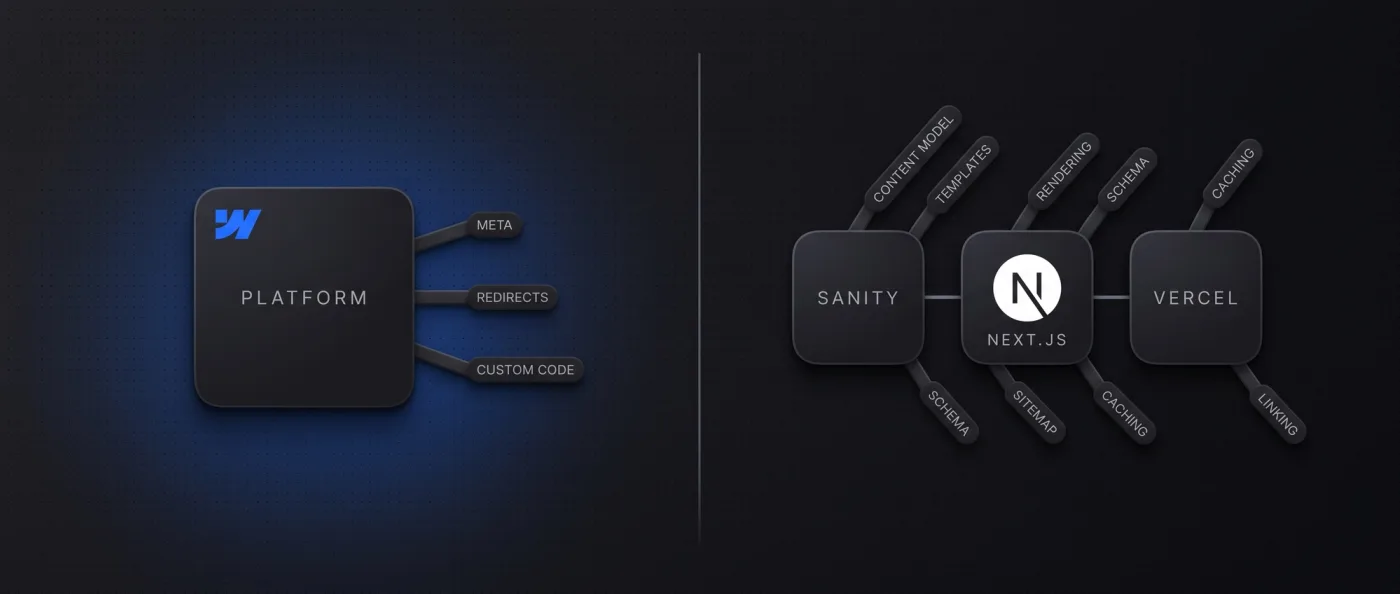
Once you run content as a system, we recommend Next.js (or Astro) with Sanity as the content database. That means: several languages with no surcharge, hundreds of knowledge articles, pages generated from structured data (industries, services, cities), connections to CRM or product data, AI agents creating content through an API. A code system gives you every lever Google and AI crawlers read: rendering, schema, sitemap, hreflang, caching, internal linking. In Webflow you control part of that list; the platform decides the rest.
Costs do not argue against code: Next.js with Sanity Free typically runs on 0-20 $ hosting per month, Webflow with CMS and one additional language on 34 $.
What is what: Webflow, Next.js, and Sanity
Webflow is a visual website builder with built-in hosting and CMS. You design in the Designer, Webflow generates HTML and CSS, hosts the website, and provides the editor. No developer needed, but you do not decide how pages are rendered, cached, or exported.
Next.js is a React framework, a scaffold an agency uses to build a website as code. It renders pages on the server (server-side rendering: the server delivers finished HTML, so Google and AI crawlers read the content without executing JavaScript) or pre-builds them statically. Next.js has no CMS. That is where Sanity comes in, a structured content database with its own editor, Sanity Studio. Content lives there as documents with defined fields, and the frontend fetches it through an API. This setup is called headless: content and presentation are separated. Details in Headless CMS explained and our Sanity overview.
Wherever this article says Next.js, almost everything also applies to Astro. Astro builds pages statically: content is baked from Sanity into HTML at build time, and only interactive parts load JavaScript (islands). We prefer Astro for marketing websites and Next.js for application logic, login, or real-time data. The hub article Website builder, Webflow, or Next.js places all three stages.
Webflow vs. Next.js head to head
Ten criteria that actually decide the question in a project. The sections below take each row apart one at a time.
| Criterion | Webflow | Next.js + Sanity |
|---|---|---|
| Design and animation | Freely designed, interactions without code | Anything the browser can do: GSAP, scroll animations, 3D |
| Editor for marketing | Webflow Editor: click text, CMS as a form | Sanity Presentation Mode: a click in the live preview opens the field |
| CMS structure | 40 collections, 20,000 items (Premium) | Your own content model, Sanity Free 10,000 documents |
| Multilingual | Add-on: 9 $ per language per month (up to 3), 29 $ (up to 10) | No surcharge, translated URL segments, hreflang from code |
| Performance | Good, but webflow.js on every page, no access to caching | Server rendering or static build, caching and images in code |
| SEO and GEO levers | Meta, canonical, sitemap, 301s in the interface, schema via custom code | Rendering, schema, sitemap, hreflang, llms.txt, IndexNow, internal linking in code |
| AI content, programmatic pages | API and MCP server available, limited by item and rate limits | Core architecture: Sanity API and Sanity MCP, hundreds of pages from one template |
| Integrations, custom logic | Forms, Zapier/Make, custom code in embeds | Any API, login, server logic, databases |
| Running costs 2026 | 25 $ Premium per website per month, plus languages, plus Workspace from 19 $ | 0-20 $ hosting per month (Vercel Pro, one seat), Sanity Free |
| Lock-in and export | HTML/CSS/JS without CMS content and interactions | Code in your own repository, hosting freely chosen |
Design and animation
On design, the two sit closer together than the debate suggests. Webflow outputs clean HTML and CSS, you build interactions without code, more complex motion with GSAP (a JavaScript animation library) via custom code. If your design can be built in Webflow, design is not an argument for Next.js.
In Next.js the agency builds every component itself. That takes longer but opens everything the browser can run: scroll animations, WebGL, 3D. Ullsteinhaus (Three.js) and Monteval (GSAP) run that way on Astro. More in Website animations; Webflow vs. Framer covers Webflow against a design builder.
Editor and content maintenance
Both sides now have an editor that works directly on the page. In the Webflow Editor you click a text, type, publish; CMS entries live in a form. Small teams can use it without onboarding. The price: anyone who works in the Designer instead of the Editor can move layouts.
Sanity Studio is a dedicated editor adapted to your content model. On top comes Presentation Mode: your marketing team sees the website live in a preview, clicks a text, and lands in the matching field. The layout stays protected because content and presentation are separated. LeanWave runs this daily, every change triggers a rebuild via webhook. Presentation Mode is included in the Sanity Free plan. The Webflow Editor is easier on day one. Sanity is stronger once one piece of content should appear in ten places without anyone copying it ten times.
CMS structure and multilingual sites
This is the limit where most Webflow clients contact us. Webflow's limits are in its own documentation: 20,000 CMS items and 40 collections per website (Premium; 100 on the Team plan), 40 collection lists and 10 nested lists per page, 100 items per list without pagination.
Run the numbers. 20 services, 30 industries, and 40 cities are 90 items: no problem. Combination pages from that (service × industry × city) are 24,000 pages, past the limit before you start. In Sanity you define the content model yourself: Free plan 10,000 documents, Growth 25,000.
Multilingual sites are an add-on in Webflow: 9 $ per language per month up to three languages, 29 $ up to ten. In Next.js or Astro with Sanity, another language costs nothing extra. LeanWave runs English on the root and German under /de, with translated URL segments (/solutions becomes /de/loesungen) and hreflang including x-default. Configuration in code, no platform fee.
Performance and Core Web Vitals
Webflow websites are fast when built cleanly. Two things you cannot change: the interaction runtime webflow.js loads on every page, even without animation, and Webflow controls caching headers and the image pipeline. On a lean marketing website, rarely the bottleneck; on many pages with many images, it is.
Next.js renders on the server or statically and then hydrates with React: the finished HTML arrives immediately, JavaScript makes the page interactive afterwards. Astro ships 0 KB of JavaScript for static content by default. In numbers: leanwave.com, which we build statically with Astro, loads about 39 KB of JavaScript in three files on its home page. One of our Webflow sites loads about 740 KB in thirteen files at the same place (our own measurement, 13 September 2026). Which thresholds Google applies is in Core Web Vitals explained. Performance is not a reason to leave Webflow as long as your scores are green.
SEO and GEO levers: what you control where
Google and AI search systems read the same page. In Webflow you control title, meta description, canonical, 301 redirects, and robots.txt in the interface; the sitemap comes automatically, hreflang with the localization add-on. Schema markup (structured data that lets Google understand FAQs, authors, and breadcrumbs) is built via custom code. Rendering and caching stay with Webflow. An llms.txt (a text file in the root directory that explains structure and core content to AI crawlers) cannot be placed in Webflow without a workaround.
In Next.js you control the chain in code: metadata per template from Sanity fields, schema as JSON-LD per page type, sitemap and robots.txt from the content model, hreflang from the translations, llms.txt as a file, an IndexNow ping on every publish, caching per route, internal linking by rules. None of these levers make you "rank better". They give you every lever Google and AI crawlers read, without having to request it from the platform. How to win AI systems as a source is in Generative Engine Optimization, the foundation in Technical SEO.
AI content systems and programmatic pages
Run this point against your own content plan; it decides the question more often than design does. Webflow and Wix have official MCP servers (an interface through which AI agents like Claude or ChatGPT work directly with a tool) and APIs. So the difference from Sanity with code is not "no MCP".
It sits in four places. First, the limits: 20,000 items, 40 collections, plus API rate limits. Second, the templates: one collection template hangs on one collection; combinations from several data sources are a workaround. Third, access: rendering, caching, schema, sitemap logic, and internal linking are out of your reach. Fourth, the architecture: in a code system, programmatic pages are the core architecture, not the exception.
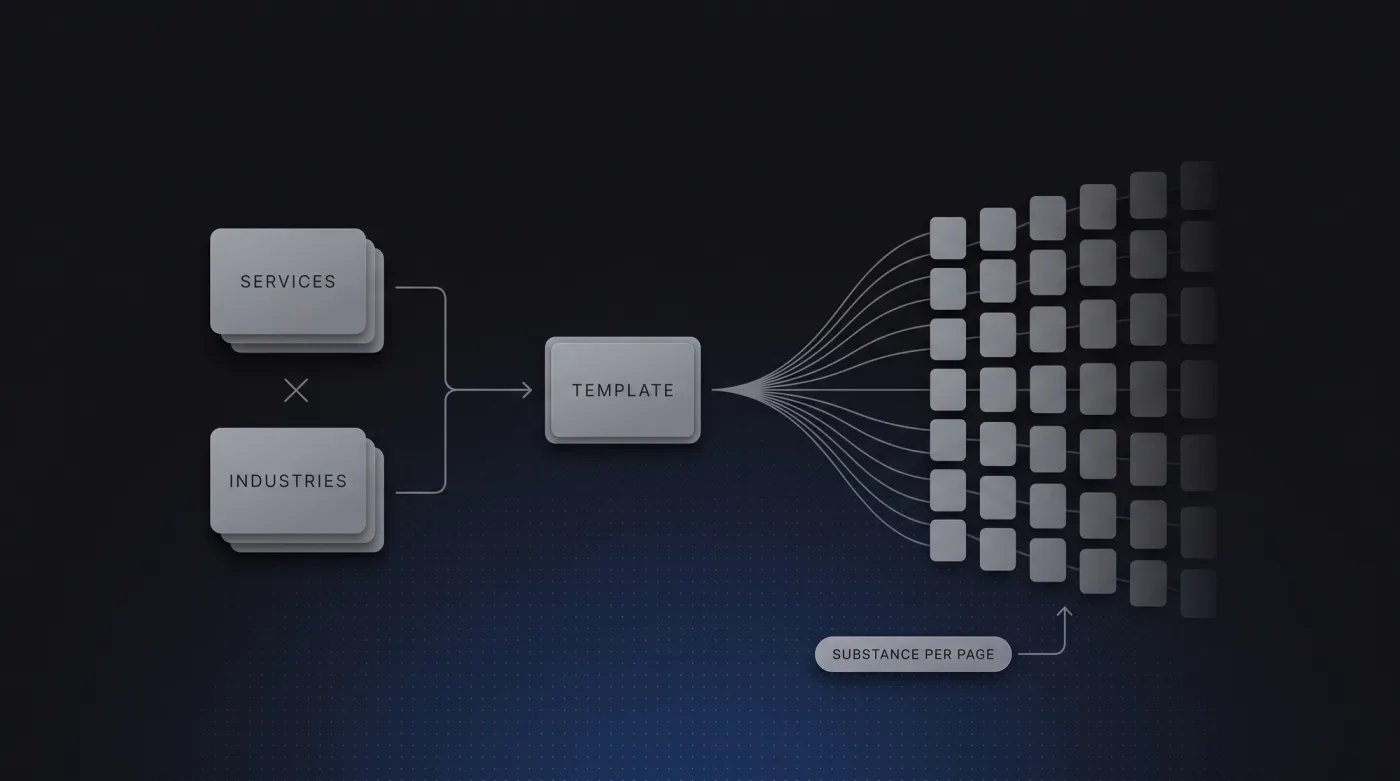
In practice, an AI agent creates drafts through the Sanity API or the Sanity MCP server, checks them against rules (word count, required fields, internal links), and hands them over for approval; a template generates pages, links, schema, and sitemap from that. Our website generates 17 city pages, 10 service pages, and 49 knowledge articles from one database this way.
And the brake belongs with it: programmatic pages only work with real substance per page. Thin bulk pages with a swapped city name get devalued by Google as doorway pages (pages that exist only to cover a keyword). We saw it on our own old website. Plan the substance per page before you plan the volume.
Costs in 2026
All prices in USD, vendor pages, retrieved on 13 September 2026. Webflow bills per website, Vercel per developer seat.
| Item | Webflow | Next.js + Sanity |
|---|---|---|
| Website plan with CMS | Premium 25 $/month (billed annually), 20,000 items, 40 collections | None |
| Additional language | 9 $/month per language (up to 3), 29 $/month per language (up to 10) | 0 $ |
| Hosting | Included | Vercel Pro 20 $/month per developer seat incl. 20 $ usage credit |
| CMS database incl. live preview | Included | Sanity Free 0 $: 20 seats, 10,000 documents, 100 GB assets, Presentation Mode |
| Example: one website, DE + EN | 34 $/month | 0-20 $/month |
| Example: one website, several languages | $25 plus $9-29 per additional language, depending on the tier Webflow does not state whether the primary language counts | $0-20/month |
At build time the math flips: a Next.js website costs more in development because the agency builds components, content model, and templates itself (see Web development cost). In operations it runs with almost no ongoing platform fees.
Lock-in and export
Webflow exports HTML, CSS, and JavaScript, but not the CMS content as part of a working system (separately as CSV or via API) and not the interactions as runnable code. Anyone who wants to keep working with the export rebuilds. That is what we did for Yarowa: 163 sections in 21 templates, five languages, ported 1:1 to Astro. The design stayed unchanged.
With Next.js the code lives in your Git repository, you export content from Sanity, and you switch hosting freely. The lock-in here is the agency, not the platform. Make sure the repository belongs to you.
Can you combine them? Webflow and Next.js side by side
Yes, in two patterns. Pattern one: Webflow as the marketing website, Next.js for the application behind it (www on Webflow, app on Next.js). This works as long as the website does not need to show prices or customer data from the app.
Pattern two: Webflow as a headless CMS. Your team maintains content in the Webflow CMS, a Next.js frontend fetches it via API and renders it itself. That puts rendering, schema, and caching in your hands. The limits remain: 20,000 items, 40 collections, localization as an add-on. Useful as a 6-12 month transition, rarely as a permanent setup.
When Webflow, when Next.js
The criteria as a decision rule, in the order we work through them in a first call.
Choose Webflow if
One point alone is not enough. If three or more apply, Webflow is the right tier.
- your website stays a marketing website and fits within 40 collections and 20,000 items
- you need one or two languages and accept 9-29 $ per language per month
- your team wants to make design changes in the Designer itself
- speed to launch matters more than control over rendering and caching
- you plan no connection to CRM, product data, or login areas.
Choose Next.js (or Astro) with Sanity if
Here the opposite applies: a single one of these points becomes a reason to migrate off Webflow sooner or later.
- you run three or more languages or want to add languages at no extra charge
- content should be generated from structured data (industries, services, cities, glossaries)
- AI agents or an editorial team should create and check content through an API
- you want to control schema, sitemap, hreflang, llms.txt, and caching yourself
- the website is connected to software: login, real-time data, portals
- you want to own code and content in your own repository.
Our verdict and three projects
We build on both sides. Webflow for clients who meet the stage-two criteria: a marketing website, a manageable CMS, one or two languages, served through our Webflow agency. For everyone who wants to run content as a system, Next.js or Astro with Sanity is the default, delivered through our web development.
Three projects show the range. Yarowa sits closest to this question: an international B2B client with a five-language website, built in Webflow, whose export we ported 1:1 to Astro. The design stayed, and languages became the default case instead of an add-on. LeanWave (Otto ID Solutions, RFID for textile services and laundries) started in code from day one: Astro, Sanity, Vercel, bilingual, editing in Presentation Mode. Our own website came from the other side, out of a builder: in-sync.io ran on Wix until 2026 and ranked for practically nothing; today 49 knowledge articles, 10 service pages, and 17 city pages run from one Sanity database on Next.js, with hreflang (language markup for Google), llms.txt, and IndexNow.
If you switch, our relaunch process applies: pre-migration crawl, ranking snapshot, 1:1 redirect map for every old URL, launch checklist, IndexNow. Step by step in Migrate Webflow to Next.js; the frame is set by our relaunch agency.
Frequently asked questions
Webflow vs. Next.js: which is better for B2B companies?
Neither across the board. Webflow fits marketing websites with a CMS up to 40 collections and 20,000 items and one or two languages. Next.js with Sanity fits once you run content as a system: several languages at no surcharge, pages from structured data, connections to CRM or software, AI-assisted maintenance through an API.
Can my marketing team edit content itself with Next.js?
Yes, through Sanity Studio and Presentation Mode. Your team sees the website in a live preview, clicks a text, and lands in the matching field, and the layout stays protected. Presentation Mode is included in the Sanity Free plan with 20 seats.
What does Next.js cost to run compared to Webflow?
A Next.js website with Sanity Free typically costs 0-20 $ hosting per month (Vercel Pro, one seat). Webflow Premium costs 25 $ per month per website, every additional language 9 $ (up to three) or 29 $ (up to ten). Code development costs more once, operations afterwards almost nothing.
Is Next.js faster than Webflow?
Not automatically, a cleanly built Webflow website reaches good Core Web Vitals scores. The difference: in Webflow, webflow.js loads on every page, and the platform controls caching and the image pipeline. In Next.js or Astro you decide that yourself; Astro ships 0 KB of JavaScript for static content, and our Astro projects sit close to 100 in PageSpeed Insights.
Can I use Webflow as a headless CMS with Next.js?
Yes. Your team maintains content in the Webflow CMS, a Next.js frontend fetches it via API and renders it itself. You gain rendering, schema, and caching and keep the editor. The limits remain: 20,000 items, 40 collections, localization as an add-on, ongoing Webflow plan. Useful as a 6-12 month transition.
How much work is switching from Webflow to Next.js?
For a marketing website with 10-30 pages we plan 3-6 weeks. The path: export CMS content as CSV or via API and import it into Sanity, rebuild the design as components, recreate interactions with GSAP or CSS, 1:1 redirect map for every old URL.
Next step
You are on Webflow and wondering whether you have already hit the limit? In a 30-minute intro call we tell you whether switching pays off or whether you should stay. Button: "Book an intro call" → /kontakt