







CMS Migration: Process, Cost and Rankings
CMS migration without losing rankings: the six phases, the redirect map, cost from 8,000 € net, 3-6 weeks to launch and how to pick your target system.

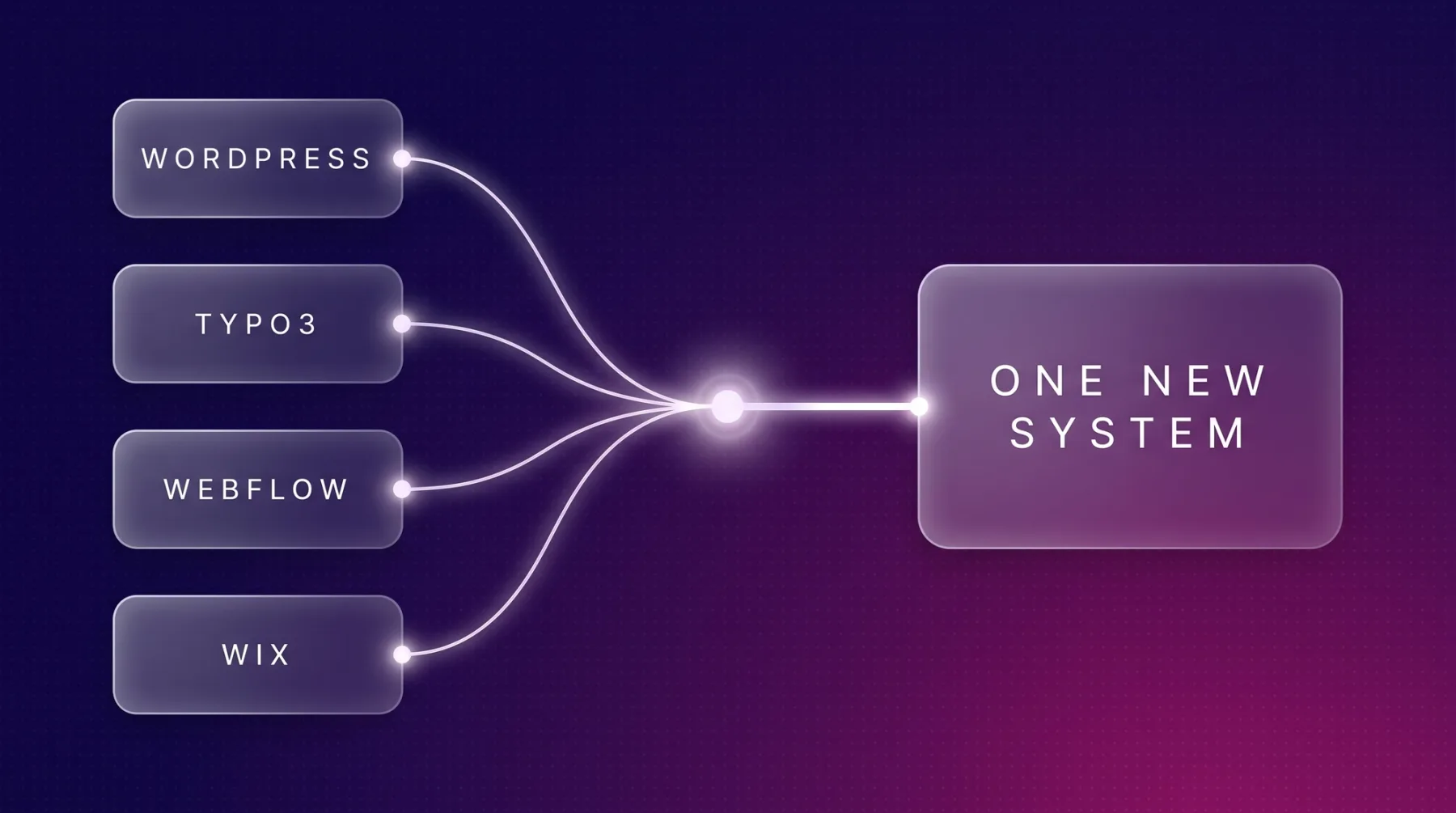
A CMS migration moves your content from one editorial system into another, with a new content model, new templates and usually new URLs. It pays off when the structure of your content is holding you back, not when you simply dislike the current look. That distinction decides several weeks of project time and a five figure budget. We moved our own website from Wix to Next.js with Sanity in 2026, and we run migrations out of WordPress, TYPO3, Webflow and site builders. This article walks you through the six phases, what always changes during a move, what each source system does on export, and how to decide on the target system.
The short answer
A CMS migration is the switch of the editorial system behind your website. Content is pulled out of the old system, mapped into a new content model and delivered through new templates. The sequence is the same no matter where you start: content inventory with a pre crawl, content model, frontend and templates, import, redirect map, launch with monitoring.
Only the export differs. WordPress hands content over through its WXR export or its programming interface, Webflow exports markup but no CMS content, and with site builders you often end up copying text rather than moving files. The effort sits in reshaping content into clean fields, not in getting it out.
For a marketing website with 10-30 pages we typically plan 3-6 weeks to go live plus two weeks of monitoring, billed as a relaunch project from 8,000 € net. Rankings hold when every old URL points to its content counterpart via a permanent redirect and you actively track 404s and positions after launch. The detailed version is in our guide to a relaunch without SEO losses.
When a migration is necessary and when a redesign is enough
A redesign swaps the surface, a migration swaps the system underneath. If your content already sits in clean fields, your editors can work and only the look bothers you, stay where you are and skip the move. Once the structure of the content is the problem, no new design will fix it.
These five triggers argue for a real system change:
- You need content types and fields your system cannot express, such as products, use cases and case studies as separate objects instead of text blocks.
- A second or third language is coming and your system charges per language or forces you into duplicates.
- The pages carry too much code. One of our Webflow client sites loads around 740 KB of JavaScript in thirteen files on its homepage, while leanwave.com, which we build statically with Astro, loads around 39 KB in three files at the same point.
- You want to generate pages programmatically from data and keep hitting template and volume limits.
- Security support for your version is running out. With TYPO3, free community support ended for v11 in October 2024 and for v12 in April 2026.
If none of that applies, a relaunch inside the existing system is the cheaper route. If more than one applies, postponing the move only pushes the cost into the future.
The six phases of a CMS migration
We run every migration in the same order, whether the old system is WordPress, TYPO3, Webflow or a site builder. The order is not a ritual: each phase produces the material the next one would otherwise have to guess.
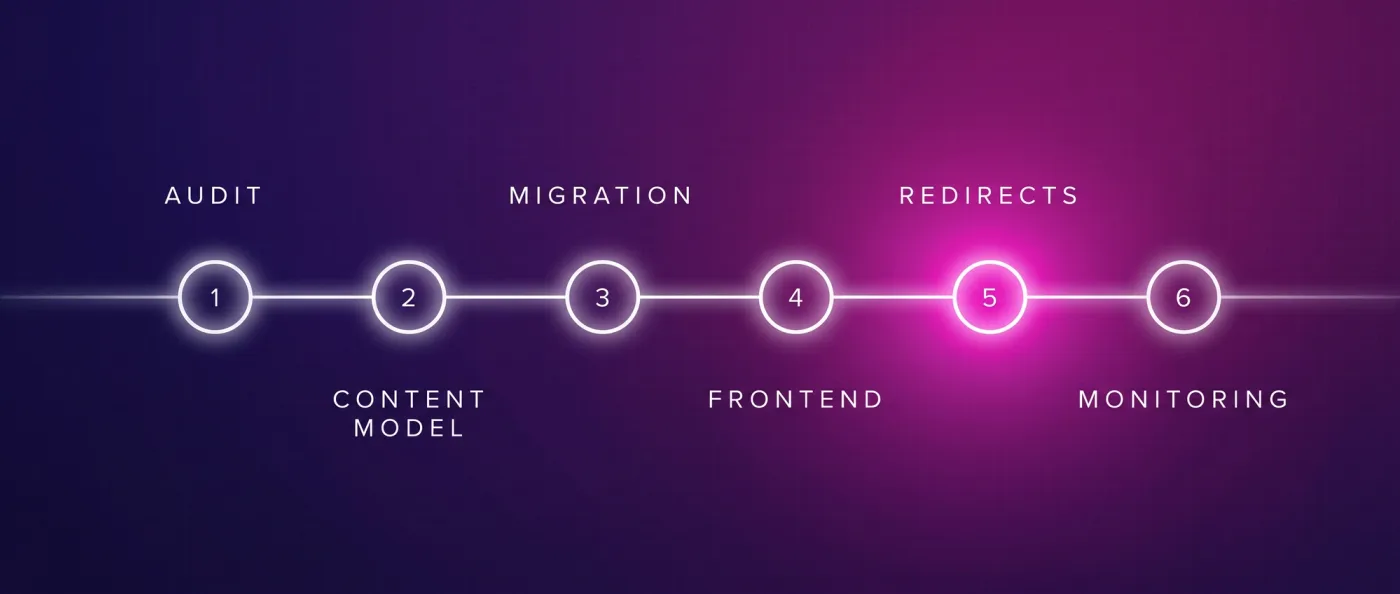
- 1
Inventory and measurement
A pre crawl with Screaming Frog or Ahrefs plus a ranking snapshot. Afterwards you know which URLs exist, which bring traffic and which you can drop without replacement.
- 2
Content model
Content types and fields are defined before a single line of frontend exists. This is where you decide whether the website grows later or turns back into a pile of text blocks.
- 3
Frontend and templates
Components and page templates are built in the new system and wired against the model.
- 4
Import
The old content is transformed and loaded in, for Sanity as NDJSON, a format with one record per line, via
sanity dataset import. Assets are downloaded and uploaded again. - 5
Redirects and launch checklist
Every old URL has a 1:1 target in the redirect map. Missing targets surface here, not after launch.
- 6
Launch and monitoring
Submission to Search Console and Bing, IndexNow to announce new URLs quickly, then two weeks of monitoring with a 404 report and a ranking comparison.
Phases 1 and 2 take time and feel like little progress. That is exactly where it is decided whether the rest runs smoothly.
Content inventory and content model
The inventory is the list of every URL with page type, traffic and position. The content model is the answer to it: which content types really exist, which fields each one needs, and what relates to what. Together they replace guesswork about which pages matter.
A workable model describes four things:
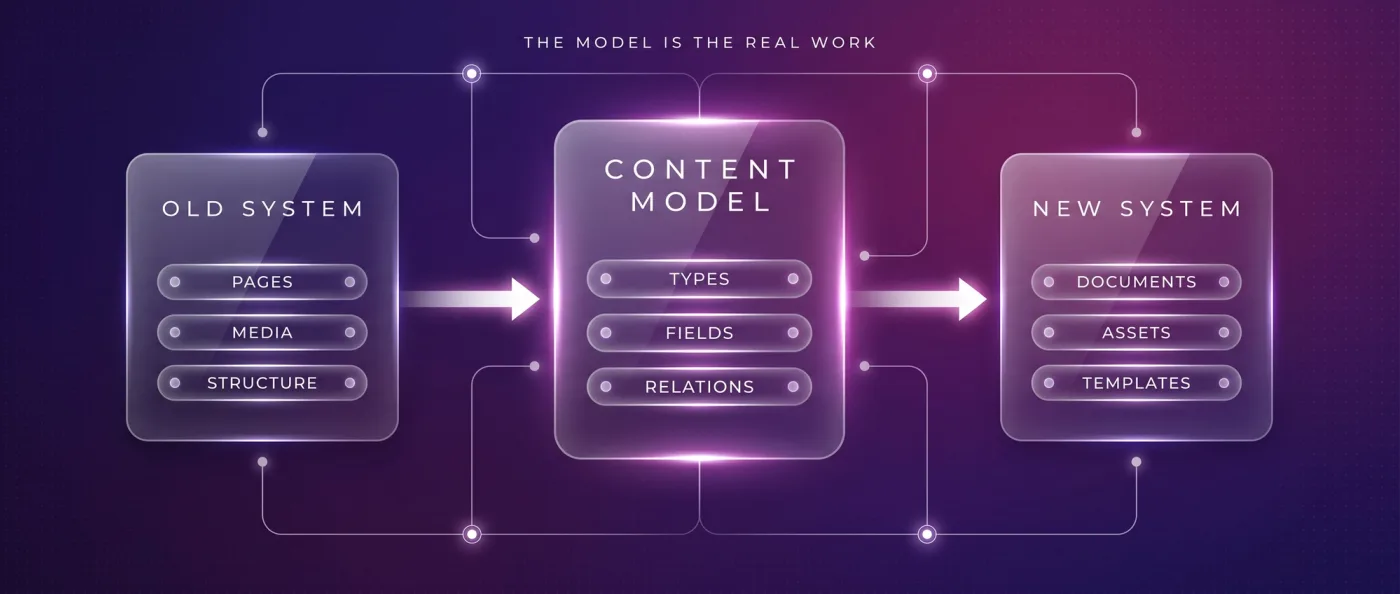
- Document types: service, knowledge article, case study, person, location. Each type gets its own template.
- Fields: title, meta description, summary, structured text sections, FAQ entries. Not a single HTML field where everything is glued together.
- References: a knowledge article points to service pages, a case study to the technologies used. Internal linking grows from that instead of being maintained by hand.
- Assets: images with alt text and caption as objects of their own, not as attachments to some paragraph.
That is precisely the difference between a classic system and a headless CMS, an editorial system without its own frontend that serves content through an interface. We use Sanity for it: content lives as structured documents while the frontend decides separately how it looks. Once the fields are clean, the third language or the fourth template no longer costs a new project.
What always changes during the move
Three things change in every system switch, no matter where you are heading. Plan them in advance and you keep your visibility. Discover them afterwards and you are repairing under time pressure.
- URLs. New systems bring new path logic, categories disappear, language segments appear. Every change needs a redirect.
- Rendering. Meaning where the page is produced: at build time, on the server per request, or in the browser. It changes loading behaviour and delivery even when the design stays identical.
- Templates. In the new system a template belongs to a document type. Pages that used to be hand built exceptions either fit the model or become a type of their own.
For URLs the rule is simple: 301 and 308 are permanent, and Google treats them as a signal that the target should be the canonical, meaning authoritative, URL. 302, 303 and 307 are temporary, Google follows them but does not treat them as a canonicalisation signal, so the old URL can stay in the index. Google names server side redirects as the most reliable option, then meta refresh, with JavaScript redirects only as a last resort. Resolve chains and point straight at the final target. All the details sit in our article on the 301 redirect.
Source system by source system: what to expect on export
The phases stay the same, the effort in phase 4 does not. Every source system hands content over differently, and that determines how much transformation sits between export and import. One line per system, the rest lives in the detail article.
| Source system | What to expect on export | Detail |
|---|---|---|
| WordPress | The WXR export or the REST API and WPGraphQL hand content over, but as HTML blocks rather than clean fields. Transforming it into NDJSON is the actual work, not the export itself. | WordPress to Next.js |
| TYPO3 | The trigger is rarely the design: anyone on v11 or v12 has left free support and either pays for ELTS or runs without security updates. Content and configuration live in PHP and TypoScript, its own configuration language, which makes the export developer work. | TYPO3 to Next.js |
| Webflow | The export delivers HTML, CSS and JavaScript, but neither the CMS content nor the interactions. You pull content as CSV per collection or through the Webflow interface, and animations are rebuilt with GSAP, a JavaScript library for motion, or with CSS. | Webflow to Next.js |
| Wix | Wix bills per website and month, from Light at 17 $ to Business Elite at 159 $, and the technology underneath is rented. We walked this path with our own website: text is carried over, the structure is created in the new content model. | Wix to Next.js |
| Site builders | Squarespace, Jimdo and IONOS lock you in on export: you get markup back, but no usable content model. Expect a rebuild plus text transfer and define the fields up front. | Squarespace alternative |
A note on WordPress, because the question comes up in every conversation: we do not work with WordPress and we do not offer headless WordPress either. Going headless costs the full relaunch effort and still leaves the WordPress installation standing with its updates, plugin dependencies and attack surface, so you end up running two systems instead of one. The single exception: business logic hangs off the installation that cannot be replaced quickly, such as WooCommerce, a membership system or an ERP connection. Then headless is a transitional solution with an end date. When a company leaves WordPress, we go straight to Sanity with our own frontend. TYPO3 we treat differently: it is a serious enterprise system with real strengths for large editorial teams, permission and approval structures and the public sector. For a pure marketing website it is usually oversized, because TypoScript and the backend need specialists and every major upgrade is a project.
Risks and how we contain them
Migrations rarely fail on design and almost always on details nobody measured. That is why measurement comes first and monitoring last, rather than the launch date.
- Lost URLs. The remedy is the pre crawl with Screaming Frog or Ahrefs and a redirect map where every old URL has a target. No blanket redirect to the homepage.
- Rankings without a baseline. A ranking snapshot before launch turns a gut feeling afterwards into a comparison with numbers.
- Content that disappears in transit. The content model is checked against the inventory before the import, document by document and field by field.
- Interactions the new system does not have. With Webflow this is the normal case, because the export does not include them. They are rebuilt with GSAP or CSS and signed off before launch.
- Silence after go live. Submission to Search Console and Bing, IndexNow, then two weeks of 404 reports and ranking comparisons. Mistakes caught in that window cost almost nothing.
What you do not need here are percentage promises. Nobody can tell you in advance how individual positions will develop. The craft is controllable, and the craft is what holds rankings.
What a CMS migration costs and how long it takes
A migration runs as a relaunch project on our side, and those packages begin at 8,000 EUR net. The price follows the number of page types, not the number of pages: fifty knowledge articles on one template cost less than five special pages with individual layouts.
On timing, for a marketing website with 10-30 pages we plan 3-6 weeks to go live, with monitoring on top. What stretches a project is almost never the technology, it is open content: texts still being written and approvals waiting on calendars. Fill the content inventory early and the project gets noticeably shorter.
After that, running cost is what matters. An Astro or Next.js website with Sanity Free typically runs on 0-20 $ of hosting per month, which means close to no ongoing platform fees. Sanity Free includes 20 seats, 10,000 documents, 100 GB of assets and 100 GB of bandwidth per month including Presentation Mode; Vercel Pro costs 20 $ per month per developer seat including 20 $ of usage credit, with no base fee per project. We charge no extra platform fee for each additional language. A broader breakdown sits under web development cost.
Choosing the target system: when Webflow is enough, when Sanity with your own frontend
The decision comes down to two numbers and one question: how many pages, how many languages, and whether pages should be generated from data in future. Everything else is taste. These nine criteria are enough for a solid answer.
| Criterion | Webflow | Astro or Next.js with Sanity |
|---|---|---|
| Page count | Comfortable up to roughly 30 pages | Three digit page counts from one model |
| Languages | Localisation as an add on, 9 $ per language per month up to 3 languages, 29 $ up to 10 | No fee per language |
| Volume limits | 20,000 CMS items, 40 collections on Premium | Sanity Free with 10,000 documents, Growth with 25,000 |
| Content model | Collections with fixed fields, one template per collection | Freely modelled, references between documents |
| Rendering | Defined by the platform | Chosen per page: static, server side, islands |
| Programmatic pages | Bound by collection limits and template binding | Generated from the database, scope set by you |
| Running cost | From 25 $ per month and website plus workspace from 19 $ | Typically 0-20 $ of hosting per month |
| Editing | Editor directly on the page | Sanity Presentation Mode with preview in daily use |
| Switching later | Export without CMS content and without interactions | Content sits in a database you own |
One note on programmatic pages, since they are often the reason for the switch: they only work with real substance on every page. Otherwise Google downgrades them as doorway pages, meaning pages that exist only to cover a keyword. We experienced that on our own old website.
Choose Webflow if
Webflow is an honestly strong middle option, and as a certified Webflow partner we support existing clients on it. For plenty of websites it is the right size.
- Your website stays around 30 pages with one or two languages.
- Marketing should build pages without triggering a deployment for every change.
- Programmatic pages from data are not on the roadmap.
- A monthly platform fee per website is not a concern for you.
Choose Astro or Next.js with Sanity if
We build with Astro and Sanity by default. Next.js comes in as soon as login, application logic or server side data per request are needed. You do not take this route without a development team.
- You plan more than two languages or translated URL segments.
- Content should exist as structured objects with references, and pages should be generated from it.
- Rendering, caching, schema and sitemap should be controllable in code, including for AI agents through an interface and an MCP server, a standardised access point for AI tools.
- The website should grow without a per language fee and without platform volume limits.
How we do it
We have taken this route ourselves. in-sync.io used to run on Wix and has been on Next.js, Sanity and Vercel since 2026: 49 knowledge articles, 10 service pages and 17 city pages from one database, bilingual with hreflang, the markup that tells Google which language version applies to whom, plus server rendering, llms.txt, IndexNow and FAQPage schema. To be straight about it: the old Wix website was barely visible in Google, the new one has been live since June 2026 and is still building its positions.
For LeanWave, RFID solutions for textile services and laundries, we built statically with Astro, alongside Sanity, Tailwind and Vercel. Bilingual with English at the root and German under /de, translated URL segments such as /solutions becoming /de/loesungen, and reciprocal hreflang including x-default. 64 documents, 86 image assets, and a webhook that triggers a new build on every change, meaning an automated call that regenerates the pages. The editorial team works in Presentation Mode and sees changes in preview.
Yarowa shows the other variant. This international B2B client came from Webflow, we ported the export 1:1 to Astro and hosted it on Vercel: 5 languages, 21 page templates, 163 sections, design unchanged. The move to Sanity with Presentation Mode is planned. That is the pragmatic path when the design should stay and delivery needs to improve first. How we set projects up technically is on our page for web development, and the full process including monitoring is described under website relaunch.
Frequently asked questions
What is a CMS migration?
A CMS migration is the switch of the editorial system behind a website. Content is pulled out of the old system, mapped into a new content model and delivered through new templates. New URLs with redirects are always part of it. For a marketing website with 10-30 pages this typically takes 3-6 weeks to go live.
What does a CMS migration cost?
We bill a migration as a relaunch project, and our relaunch packages start at 8,000 € net. The price follows the number of page types and languages, not the number of pages. Afterwards, an Astro or Next.js website with Sanity Free typically runs on 0-20 $ of hosting per month.
Will I lose my rankings when switching CMS?
Not if every old URL points to its content counterpart via 301 or 308. Google treats these permanent redirects as a signal that the target should be the canonical URL. We produce a crawl and a ranking snapshot before launch and then check 404s and positions for two weeks.
How long does a website migration take?
For a marketing website with 10-30 pages we plan 3-6 weeks to go live, with monitoring on top. Delays almost always come from open texts and approvals, not from technology. Fill the content inventory early and finalise content in parallel, and you stay at the lower end of that range.
Do I really need a new system or is a redesign enough?
A redesign is enough when your content already sits in clean fields and only the look bothers you. A system switch pays off once fields are missing, another language is coming, volume limits bite or free security support runs out, as with TYPO3 v11 in October 2024 and v12 in April 2026.
Do you offer headless WordPress as an interim step?
No. Going headless costs the full relaunch effort and still leaves the WordPress installation standing with its updates, plugin dependencies and attack surface, so you run two systems instead of one. The only exception is business logic such as WooCommerce or an ERP connection, and then only as a transitional solution with an end date.
Next step
Send us your current URL and the number of languages you need, and we will tell you whether a redesign is enough or a system switch is the right call.