






WordPress to Next.js: Process, Time and SEO
WordPress to Next.js migration without ranking loss: six phases, a redirect map for every old URL, 3-6 weeks to launch, relaunch from 8,000 euros net.

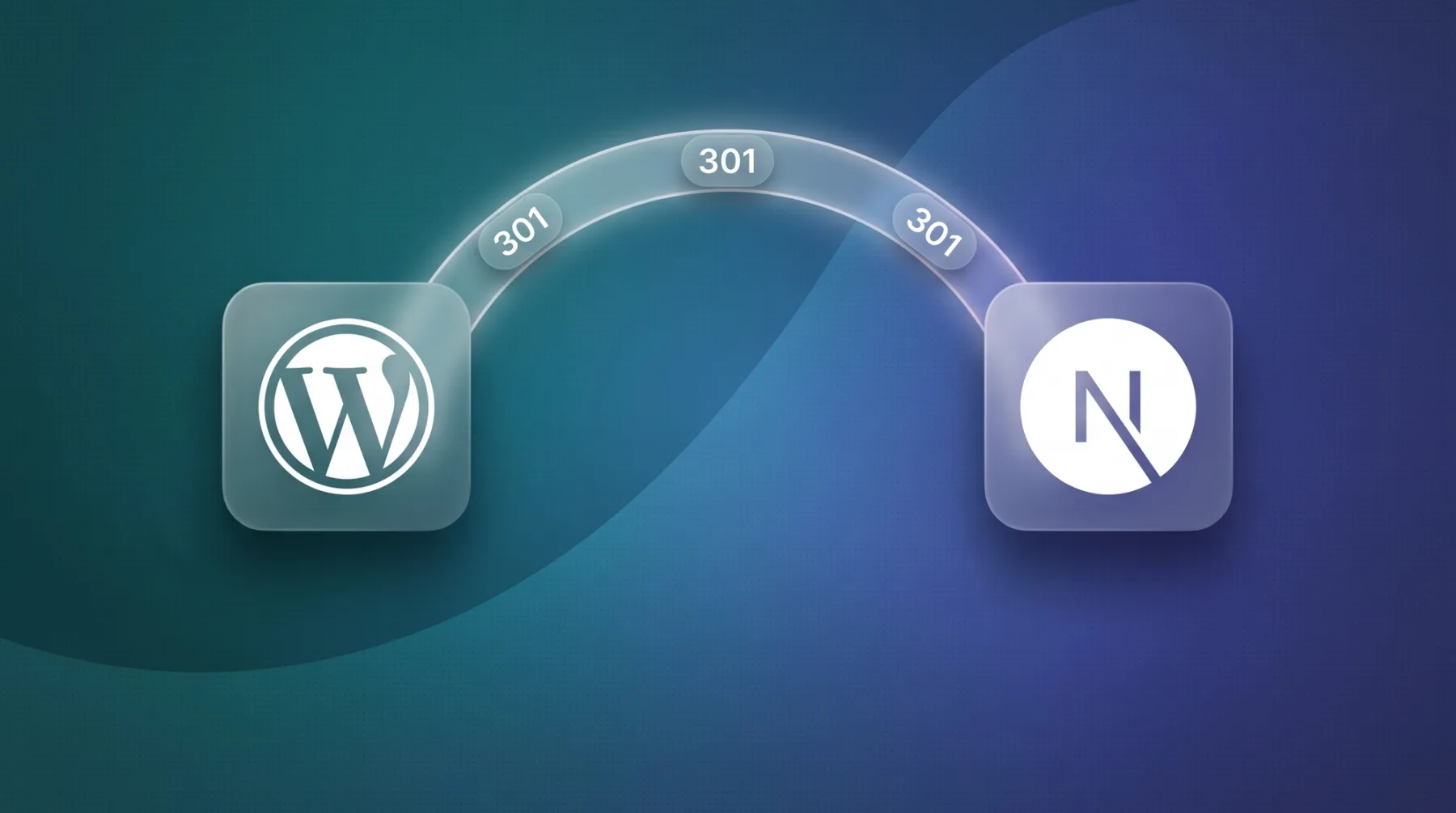
A WordPress website can move to Next.js without losing rankings, as long as every old URL gets a 1:1 redirect and content, titles and meta data travel with it. Next.js here stands for the code system as a whole. Without app logic, logins or server side data per request, we build the same thing with Astro, and the phases stay identical. A marketing website with 10-30 pages usually goes live within 3-6 weeks, followed by two weeks of monitoring. This article covers the two possible routes, six project phases, a table of what moves and how, the five real risks and what the project costs.
The short answer
Moving from WordPress to Next.js runs in six phases: audit and redirect map, content model in Sanity, content migration, frontend build, SEO parity and launch, monitoring. Rankings hold when three things are true: every old URL points via a 301 redirect to exactly one new target, the content arrives complete, and titles, meta descriptions, canonicals (the tag that says which URL is the authoritative version of a page) and structured data carry over unchanged. Our guide to a relaunch without SEO loss goes deeper.
Next.js in this article stands for the code system as a whole. If you need no app logic, no login and no data calculated per request on the server, we build the same website with Astro and nothing in the process changes. Astro ships 0 KB of JavaScript by default for static content, only interactive parts load scripts. That is why Astro is our default and Next.js is the pick as soon as a login, a dashboard or personalised content enters the picture. The detailed comparison is in Astro vs. Next.js.
On billing: we treat a migration as a relaunch project, and our relaunch packages start at 8,000 euros net. Moving a marketing website with 10-30 pages usually takes 3-6 weeks to go live, with monitoring on top. After that you pay almost nothing in platform fees: Sanity Free includes 20 seats, 10,000 documents, 100 GB of assets and 100 GB of bandwidth per month, Vercel Pro costs 20 $ per month and developer seat. Theme and plugin licences disappear. We break down what a project like this involves in web development cost.
Two routes, and we only build one of them
One decision determines everything after it: does WordPress stay in the background as the editing system and serve data to a new frontend, or does the content move into Sanity and WordPress get switched off? The first route is called headless, WordPress without its own output layer, with content coming through the REST API or WPGraphQL, a query interface for WordPress data. Both routes lead to a fast website. They differ in what you still have to maintain afterwards.
We will say plainly where we stand: we build the second route. Headless WordPress costs the same relaunch effort and still leaves the WordPress install standing, with its updates, plugin dependencies and attack surface. We have still described the first route in detail in headless WordPress so you can check the maths yourself.
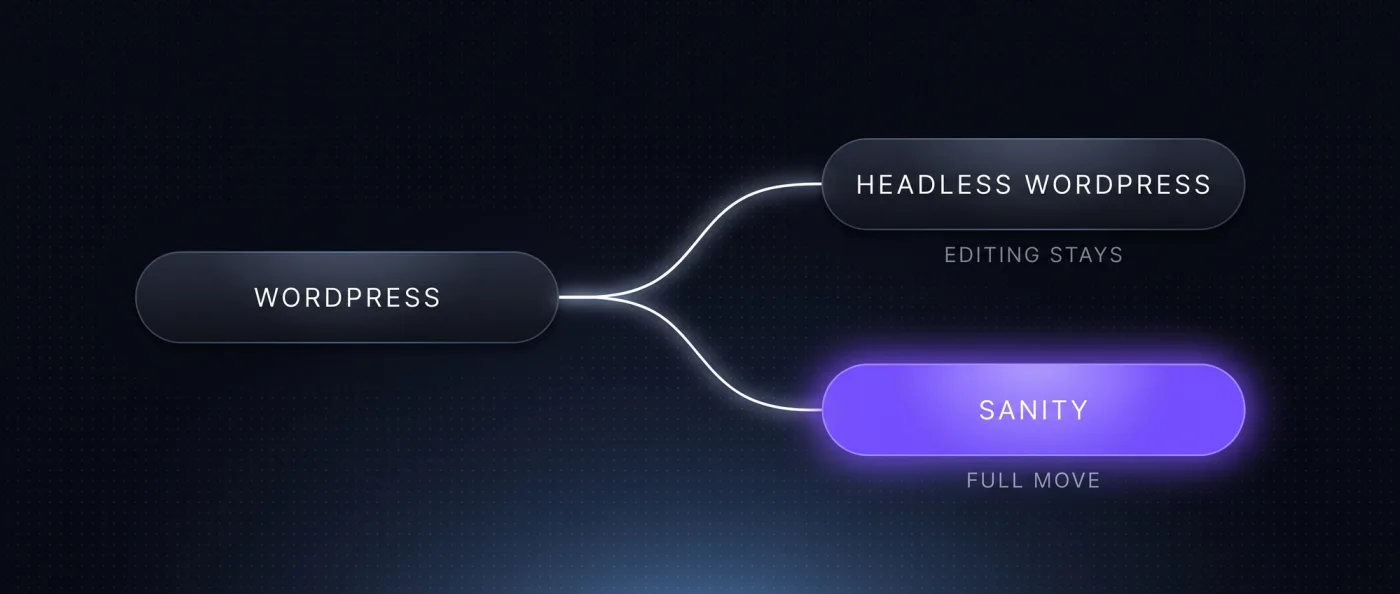
Headless WordPress stays an exception
Keeping WordPress as the backend is defensible in exactly one situation: when the install carries business logic you cannot replace on short notice. Everything else is habit, and habit is a poor reason to run two systems permanently.
- WooCommerce or a membership plugin carries revenue logic you do not want to replace in one go.
- An integration into an ERP or a customer database is built against WordPress and has its own maintenance contract.
- In both cases the rule is the same: headless with an end date, not as a permanent state. Without an end date it stays a second system that needs maintenance.
Choose the move to Sanity if
Move the content when the website mainly carries marketing and content, and you want to avoid running two systems side by side. Headless WordPress still means servers, updates, plugin care and security patches, just hidden behind the new interface.
- Your website is made of posts, pages, services and case studies, not shop or membership logic.
- You want a content model with clear fields instead of an editor that mixes layout and content.
- Multiple languages are coming up: with us, each additional language costs no per language surcharge.
- You want content created and checked through an API and an MCP server, a standard interface for AI tools, including by agents.
Our recommendation for marketing websites is the second route, and the reason is operating effort. Headless WordPress only moves the maintenance around. You still run a WordPress install with updates and licences, plus a frontend. With Sanity as a structured content database an entire operational layer disappears, and you drive the content model, templates, rendering, schema, sitemap and internal linking from code. What a headless CMS actually is and how Sanity works day to day is covered in the two linked articles.
When the switch is worth it
The switch pays off when the current setup costs you money or visibility. These seven triggers come up most often in first calls.
- 1
Load time has become a sales topic
Page builders and a dozen plugins load scripts that block each other. When Core Web Vitals, Google's measurements for loading behaviour and stability, stay red, tuning the old setup eventually costs more than rebuilding. Details in Core Web Vitals.
- 2
Plugin dependency blocks decisions
Every function hangs on an extension, every extension on a vendor. One update breaks the layout, one discontinued plugin forces a rebuild.
- 3
Security and maintenance eat budget
Updates, backups, patches and compatibility tests run every month without making the website any better.
- 4
Multiple languages are coming
Translation plugins build parallel structures, and hreflang, the markup that tells search engines which language version serves which country, turns into a source of errors.
- 5
The content model no longer fits
You need structured fields for services, case studies, locations and people, but everything ends up in one rich text editor.
- 6
You want programmatic pages
Location or use case pages from a data source only work with real substance per page. Otherwise Google treats them as doorway pages, pages that exist only to cover a keyword. We experienced that on our own old website.
- 7
AI answers are becoming a channel
Clean structured data, llms.txt and fast delivery are all controllable in code. How that fits together is in technical SEO.
When you stay on WordPress
Stay when the website works and none of the seven points apply to you. A cleanly built WordPress with a light theme, few plugins and maintained content is not a problem that needs solving. A migration ties up budget and attention, and both could go into content instead.
- The website has up to around 30 pages, one language and no programmatic pages planned.
- Core functions depend on plugins with no reasonable replacement in code.
- Your traffic comes almost entirely from paid channels and organic visibility is not a goal.
- Nobody in house maintains content and the website changes once a year.
The process in six phases
The process is the same whether Next.js or Astro runs at the end. Phases 1 to 5 together make up the 3-6 weeks until go live, phase 6 runs for two weeks after that. We keep the order strict: no website goes live without a finished redirect map.
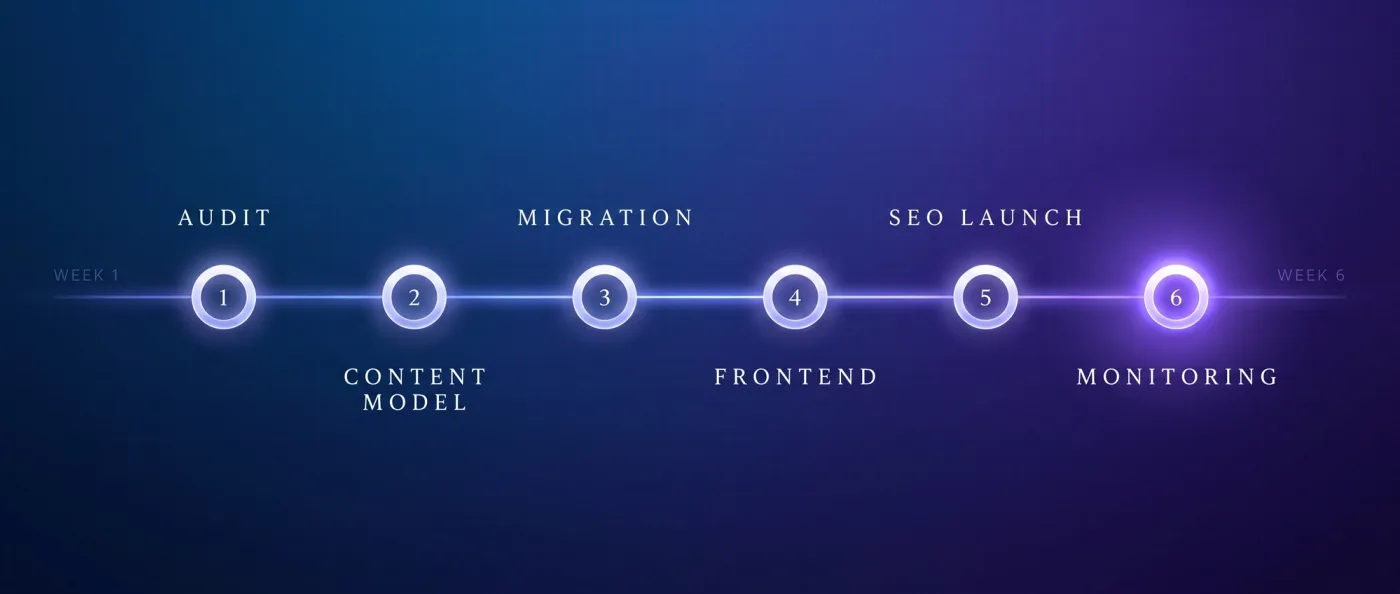
- 1
Audit and redirect map
We crawl the old website with Screaming Frog or Ahrefs, take a ranking snapshot and read the WordPress URL patterns: date permalinks like /2021/08/title, category paths like /blog/category/title, attachment pages, author and pagination pages. The slug mapping comes straight out of the export, and every old URL gets exactly one new target. Result: a complete 1:1 redirect map and a list of the pages that carry traffic. Timing: the start of the project, before a line of frontend code exists.
- 2
Content model in Sanity
We translate posts, pages, custom post types, categories, tags, media and languages into document types with defined fields. One rich text field becomes text blocks, images, quotes and call to action blocks with their own fields. Result: a schema that the import and the frontend can both be built against. Timing: in parallel with the end of phase 1.
- 3
Content migration
Content comes out through the WXR export, the XML export format of WordPress, or through the REST API or WPGraphQL. We then transform it into the Sanity schema and import it as NDJSON, a line by line format for records, via
sanity dataset import. Every asset in /wp-content/uploads gets downloaded and re-uploaded into Sanity so no image URL still points at the old install. Result: all content and media in the new system, checkable page by page. Timing: the single biggest block in the project. - 4
Frontend build
Templates, components, navigation and forms are built fresh in code and wired to Sanity. This is where you decide between static delivery through a CDN, a delivery network with servers close to the visitor, and server rendering per request. Result: a preview environment where your team can compare every page against the original. Timing: partly parallel to phase 3.
- 5
SEO parity and launch
Titles, meta descriptions, canonicals, structured data, sitemap, robots.txt and hreflang are checked field by field against the pre-migration crawl. Then redirects go live, we submit the sitemap in Search Console and Bing and push the URLs through IndexNow. Result: a launch with no missing meta data and no dead links. Timing: the last days before the switch.
- 6
Monitoring
For two weeks a 404 report and a ranking comparison run against the snapshot from phase 1. Anything odd gets fixed immediately, and it is usually a redirect gap on old attachment or pagination pages. Result: a defensible statement about where rankings stand after the move. Timing: two weeks after go live, then the project hands over to ongoing SEO support.
What moves out of WordPress and how
Not every content type moves the same way. Posts and pages are diligent work, while forms and plugin functions need a decision. We use this table in first calls to make the effort visible early.
| From WordPress | Target in the new system | Effort |
|---|---|---|
| Posts | Document type with text blocks, author, date, image | Low, automated through export and import |
| Pages | Own document type or a set of sections | Medium, one layout decision per page type |
| Custom post types | One document type each with defined fields | Medium, depends on field quality in the original |
| Categories and tags | References to taxonomy documents | Low, transfers 1:1 |
| Media | Sanity asset library, uploaded fresh | Medium, volume decides, image URLs change |
| Forms | Own form component with an external delivery service | Medium, plugin logic does not carry over |
| SEO plugin data | Fields for title, description, canonical, schema | Low, if Yoast or Rank Math was kept clean |
| Redirects | Redirect rules in the hosting configuration | Medium, chains have to be resolved |
| Comments | External service or a deliberate shutdown | Low, mostly a product decision |
| Search | Client index or a search service instead of WordPress search | Medium, depends on page count and languages |
Risks and how we contain them
Five things go wrong in migrations again and again, and all five are avoidable. We plan for them from the start.
- Ranking loss. The cause is almost always an incomplete redirect map. Counter: a pre-migration crawl plus a ranking snapshot, one target for every old URL, and two weeks of 404 reporting after launch to catch the rest.
- Plugin functions with no replacement. Booking systems, calculators, member areas. Counter: in the audit we list every plugin function with its usage and decide per function before the project starts: rebuild, embed externally or drop.
- Image URLs. Old paths under /wp-content/uploads break the moment WordPress is switched off. Counter: download all assets, upload them fresh, rewrite every reference inside the content during import.
- Redirect chains. Old websites often already carry redirects from earlier relaunches, which then grow to three hops. Counter: we collapse every chain into a single redirect to the final target.
- Design drift. When the new frontend looks different, every ranking wobble gets blamed on the design. Counter: either redesign deliberately or port 1:1, but not half of both. For Webflow projects we described the same process in migrating Webflow to Next.js.
Cost and timeline
We bill a migration as a relaunch project, and our relaunch packages start at 8,000 euros net. The price depends on page types, content volume and the functions that have to be rebuilt out of plugins. A marketing website with 10-30 pages usually goes live in 3-6 weeks, with the two week monitoring window on top.
Running costs drop noticeably after the move. WordPress itself is free, and the cost sits in hosting, theme and plugin licences and the maintenance attached to them. After the migration, an Astro or Next.js website with Sanity Free typically runs at 0-20 $ of hosting per month, so almost no ongoing platform fees. We sort through the other options in WordPress alternatives.
- Project price: relaunch package from 8,000 euros net, depending on page types, content volume and functions.
- Timeline: 3-6 weeks to go live at 10-30 pages, plus two weeks of monitoring.
- Running: Sanity Free with 20 seats, 10,000 documents, 100 GB of assets and 100 GB of bandwidth per month.
- Hosting: Vercel Pro at 20 $ per month and developer seat including 20 $ of usage credit, no base fee per project.
Our verdict: how we did it ourselves
Our own website is the reference case. in-sync.io came off Wix in 2026 and ran through exactly these phases: audit, content model, migration, frontend, SEO parity, monitoring. Today 49 knowledge articles, 10 service pages and 17 city pages sit in a single Sanity database, bilingual with hreflang, with server rendering, llms.txt, IndexNow and FAQPage schema. To be straight about it: the old Wix website ranked for close to nothing. The new one has been live since June 2026 and is building its rankings.
Yarowa shows that a 1:1 port of the design works. That international B2B client had a five language website in Webflow. We ported the export 1:1 to Astro and hosted it on Vercel: 5 languages, 21 page templates, 163 sections, design unchanged. The rebuild on Sanity with Presentation Mode is planned. For your WordPress migration that means you do not have to choose between new technology and a familiar design. How we set up relaunch projects is on our relaunch agency page, and the build itself runs through our web development team.
Frequently asked questions
Can you migrate a WordPress website to Next.js?
Yes. Content comes out through a WXR export or through the REST API or WPGraphQL, gets transformed and imported into Sanity as NDJSON, and the frontend is built fresh in Next.js or Astro. At 10-30 pages that usually takes 3-6 weeks to go live, plus two weeks of monitoring.
Will I lose my Google rankings in the migration?
Not if every old URL points via a 301 to exactly one new target and the content arrives complete. We take a crawl and a ranking snapshot first, build the redirect map 1:1, and check the 404 report and rankings against that snapshot for two weeks.
What happens to my WordPress plugins?
They do not come along. Forms, search and comments get replaced in code or through external services, and functions like booking systems are decided one by one in the audit: rebuild, embed externally or drop. That is why the list exists before the project starts, not after.
Should I keep WordPress as a headless backend?
Only if your team works in it daily or plugins carry revenue logic. Otherwise you keep running servers, updates and licences behind a new frontend. For marketing websites we recommend the full move to Sanity, because an entire operating layer falls away.
What does a WordPress to Next.js migration cost?
We bill it as a relaunch project, and our relaunch packages start at 8,000 euros net. The price depends on page types, content volume and the functions that need rebuilding. Afterwards, platform cost typically sits at 0-20 $ of hosting per month with Sanity Free.
Next.js or Astro for my WordPress migration?
Astro is our default when the website delivers content: for static content it ships 0 KB of JavaScript by default. We pick Next.js as soon as app logic, logins or data calculated per request on the server are needed. The migration process stays identical either way.
Next step
Send us your WordPress URL and you get an assessment of page types, effort and redirect scope.