




Headless WordPress: Keep WordPress, Swap Frontend
Headless WordPress keeps WordPress in the background and swaps only the frontend. What it solves, what it does not, and why we go to Sanity instead.

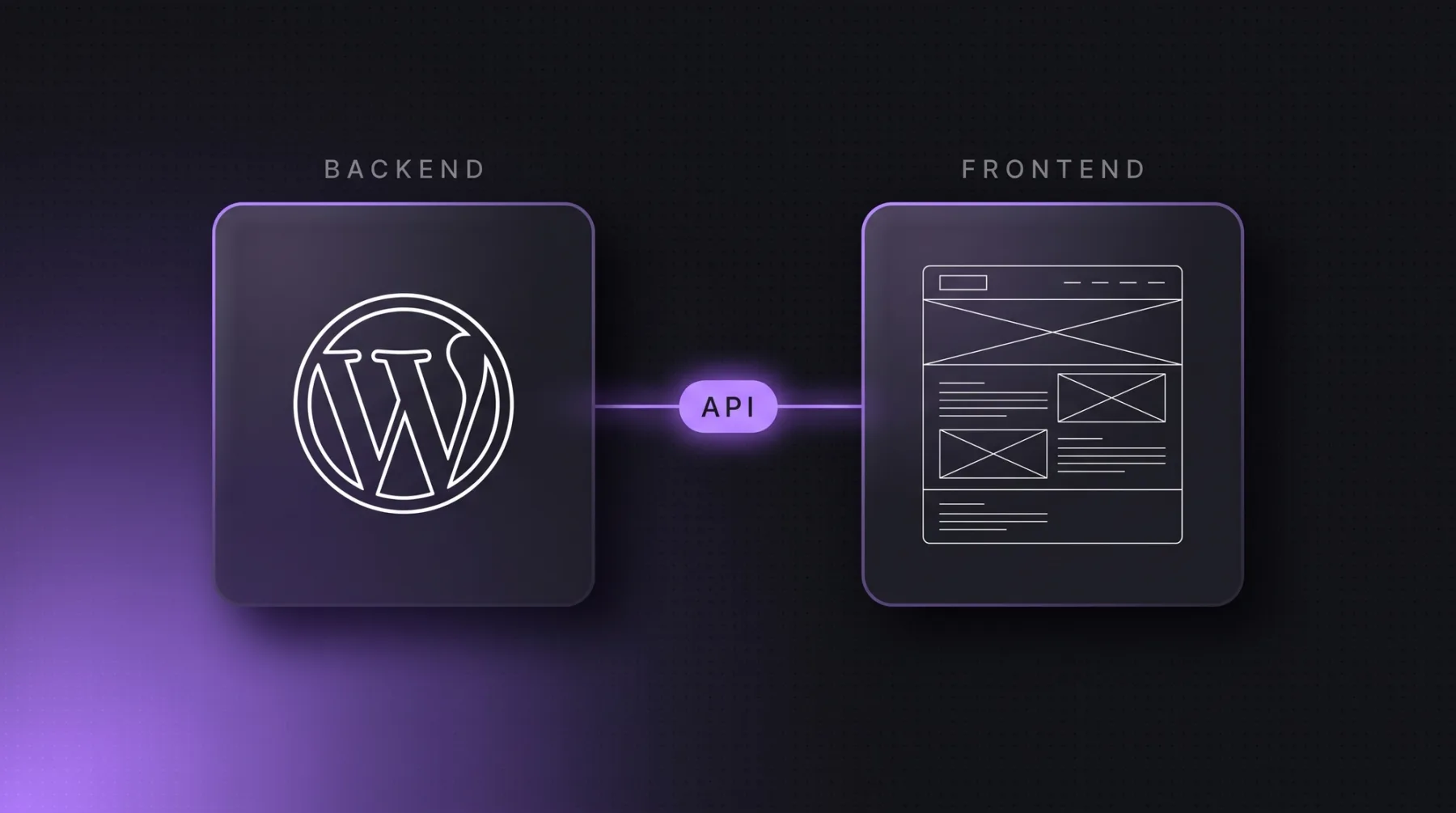
Headless WordPress means WordPress stays your editorial system and database while a separate frontend builds the public website and pulls the content through an interface, usually WPGraphQL or the REST API. The theme goes, the editors stay. For companies with a large content archive and a team used to WordPress, that is a clean intermediate step. For everyone else it is a second system that needs maintaining. This article walks through the technical setup, compares it with classic WordPress and a headless CMS, covers what the rebuild fixes and what it does not, and shows when to change editorial systems instead.
The short answer
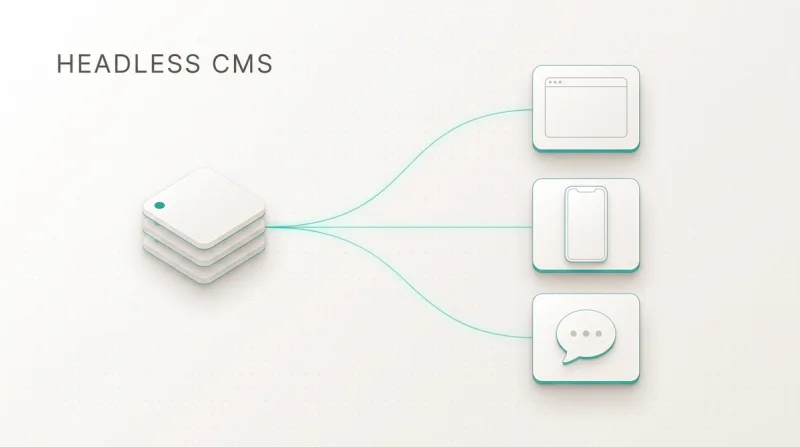
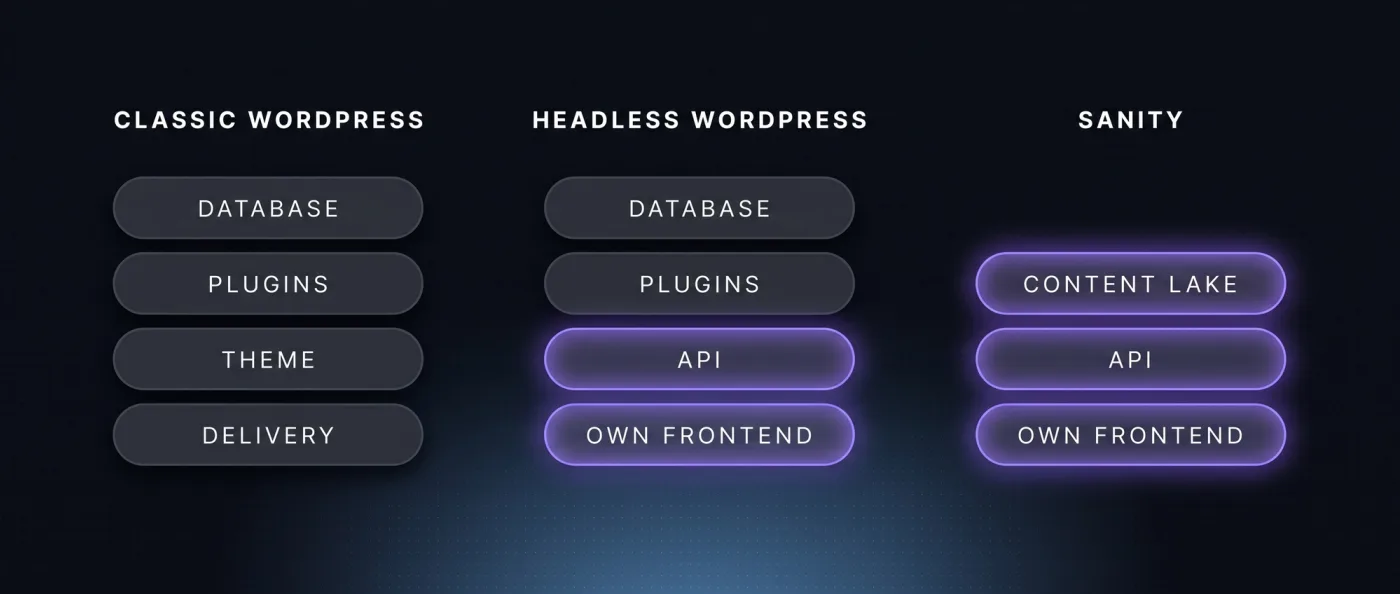
Headless WordPress is a setup in which WordPress is only the editing system and the database. Content is no longer poured into HTML by a WordPress theme but served through an interface: through WPGraphQL, a plugin that exposes content as a GraphQL query, or through the REST API that ships with WordPress. A separate frontend, built in Astro or Next.js, pulls the data and renders the pages. Headless means exactly that: the head, the presentation layer, is cut off.
It works technically. The question is what you take on with it. After the rebuild you run two systems instead of one: the WordPress install with its updates, plugin dependencies and attack surface stays, and a frontend with build, deploy and cache logic sits in front of it. The part that creates the work stays exactly where it was. All you have really solved is the output.
That is why we do not build headless WordPress. If a company needs a new frontend anyway, pulling the content straight into Sanity is barely more work than the headless rebuild, and afterwards you run one system instead of two. The exception is an install carrying real business logic, WooCommerce for example. More on that below.
How headless WordPress works technically
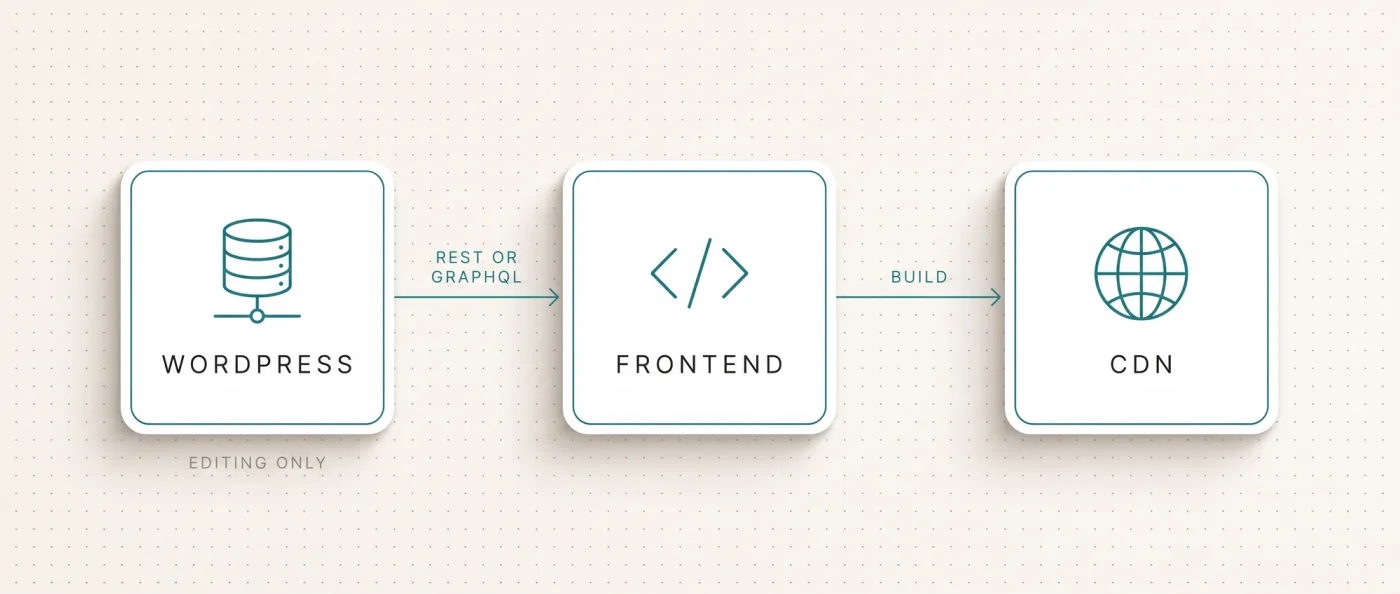
The setup has five layers. Each one can be replaced on its own, which is exactly what appeals to development teams.
- 1
WordPress as the backend
The install keeps running on your hosting, but no visitor ever opens it. Editors work in Gutenberg, the WordPress block editor. The theme renders nothing, it only exists as a required file in the background. The public WordPress URLs get blocked or redirected so two versions of the same page never reach the index.
- 2
The interface
You have two routes. The REST API serves posts, pages and fields as JSON, a machine-readable text format, and needs no extra plugin. WPGraphQL is a plugin and exposes the same content as a GraphQL query: one call returns exactly the fields you asked for instead of stitching several REST calls together. Custom field types need a matching extension, otherwise they never show up in the query.
- 3
The frontend
This is the decision that sets your speed. Astro is our default for content pages: it ships 0 KB of JavaScript for static content by default, and only interactive parts, called islands, load scripts. You pick Next.js once logins, application logic or per-request data enter the picture. The details are in Astro or Next.js.
- 4
Build and deploy
During the build the frontend pulls all content through the interface and writes finished HTML files, known as static rendering or SSG. The alternative is rendering on the server for every request, called SSR, which makes sense for personalised or very frequently changing content. Delivery runs over a CDN, a network of servers that keeps the files close to the visitor.
- 5
Cache invalidation on publish
Skip this and your editors never see their changes. A webhook, an automatic call WordPress fires on save, triggers the rebuild. LeanWave runs exactly this pattern with Sanity: a rebuild by webhook on every change. With a large archive you rebuild only the affected pages plus the overviews they appear on.
Projects usually fail at step five. Content and presentation now live apart, so every change has to find its way through the build. Wire that loosely and you get editors who publish and then watch nothing happen.
Classic WordPress, headless WordPress and Sanity compared
The three models differ less in features than in where the work lands. The table lists ten criteria that regularly decide our projects.
| Criterion | Classic WordPress | Headless WordPress | Headless CMS with Sanity |
|---|---|---|---|
| Editor | Gutenberg, tuned to the theme | Gutenberg, disconnected from the frontend | Sanity Studio, fields modelled freely |
| Preview | shows the resulting page | shows the theme, not the live page | Presentation Mode shows the real page |
| Rendering | theme and PHP, plugin dependent | your choice, static or server side | your choice, static or server side |
| JavaScript weight | depends on theme and plugins | decided by the frontend alone | decided by the frontend alone |
| Plugins | full ecosystem available | only plugins that supply data | no plugins, features live in code |
| Maintenance | one install, updates, attack surface | one install plus a frontend | hosted editorial system, no install of your own |
| Multilingual | via plugin | via plugin, hreflang set by the frontend | modelled in the content schema, hreflang from code |
| Content reuse | tied to your own website | available to any channel via the interface | available to any channel via the interface |
| Recurring platform cost | hosting plus theme and plugin licences | WordPress hosting plus frontend hosting | Sanity Free at 0 $ with 10,000 documents, Vercel Pro 20 $ per seat |
| Systems in operation | one | two | one plus hosting |
hreflang is the markup that tells Google which language version belongs to which market. It has to be reciprocal or Google ignores it. In a headless setup your frontend handles it instead of a translation plugin, which is mostly an advantage: you control the output in code. How we handle that in practice is covered in technical SEO.
What headless WordPress solves
Four things genuinely improve with the rebuild, and they are why teams take on the effort.
- Speed. In a classic setup load time depends on the theme, the page builder and every plugin writing its own JavaScript into the page. Headless, you decide what gets shipped. For scale, from our own measurement: leanwave.com, which we build statically with Astro, loads around 39 KB of JavaScript in three files on its homepage. One of our Webflow client pages loads around 740 KB in thirteen files at the same point. That gap comes from the frontend, not the editorial system.
- Control over rendering and schema. You decide which pages are prebuilt and which the server renders per request. Structured data such as FAQPage markup, canonical tags, the signal that marks the authoritative version of a page, and the sitemap all come from code instead of three competing plugins. That is the groundwork for being cited in AI answers, because the models favour structured pages that load fast.
- Content separated from layout. Editors write content, not layouts. When the design changes, the frontend changes, not the archive. Anyone who has replaced a page builder knows how much layout hides inside posts where it does not belong.
- Reusable content. Anything exposed through the interface can go anywhere: website, landing pages, an app, a partner portal. Content becomes data instead of pages.
The first two matter most in B2B. A website meant to explain an offer and generate enquiries gains more from load time and clean markup than from any additional plugin. How we set that up is covered under web development.
What headless WordPress does not solve
The honest part, and the reason we do not recommend this rebuild to every client. Headless WordPress removes none of the work WordPress creates.
- The WordPress install stays. Core updates, plugin updates, PHP versions, backups, attack surface: unchanged. An install that has to be reachable so your build can query it is an install that needs securing. The rebuild reduces the surface for visitors, not for attackers.
- The editor is still Gutenberg. Anyone unhappy with the block editor stays unhappy. Fields cannot be modelled as freely as in a headless CMS, and blocks remain a layout concept inside a system that no longer renders layouts.
- Preview no longer matches. This is the daily pain point. WordPress preview renders the theme, the live page renders your frontend, and the two look different. Sanity solves precisely this with Presentation Mode, where editors see fields on the left and the real page on the right. LeanWave runs that day to day. For headless WordPress you build a preview yourself, and it stays an approximation.
- Many plugins stop working. Anything that renders into the theme drops out: forms, search, SEO plugins and their meta output, caching plugins, page builders like Elementor or Divi. You rebuild those features in the frontend or replace them with services. Budget for it before you decide.
- Two systems instead of one. Two deployments, two update cycles, two sources of failure, and possibly two agencies. For a team without technical support, that is the real hurdle, not the technology.
This list is why many projects that start headless later change editorial systems anyway. If you are rebuilding the frontend regardless, importing the content is the smaller half of the job. The routes are laid out in migrating WordPress to Next.js and in our overview of WordPress alternatives.
Headless WordPress or a headless CMS straight away
Both routes end up on the same frontend technology. The difference is whether you keep WordPress as the data source or move the content once and run a single system afterwards. Our position is clear: headless WordPress is not a step on the way to somewhere, it is a state projects get stuck in. The rebuild costs a full relaunch once, and afterwards you still carry WordPress maintenance plus a second operational layer. If you are spending that effort anyway, spend it once and land on a headless CMS such as Sanity, where preview, content model and maintenance live in one system.
The one case where headless WordPress holds up
There is one constellation in which we would not push somebody to move completely: when the WordPress install carries business logic that cannot be replaced in one go.
- WooCommerce or a membership system carries revenue or access logic that cannot be replaced in a first step.
- An integration into another system, an ERP or a customer database for example, is built against WordPress and has its own maintenance contract.
- In that case headless is a transitional setup with an end date, not a permanent state. Without an end date it is simply a second system.
Choose a headless CMS if
These points argue for skipping the detour and moving the content once.
- Editors should see what is live while they edit. Presentation Mode and visual editing are included in the Sanity Free plan, along with 20 seats and 10,000 documents.
- You want to run content as a database and drive the content model, templates, schema, sitemap and internal linking from code instead of spreading them across plugins.
- Multiple languages are planned or already live. With us every additional language carries no per-language surcharge, unlike translation plugins in WordPress and add-ons in website builders.
- Nobody on the team wants to keep a WordPress install with updates and a security surface alive just to store text.
If you are still weighing frontend options, the comparison of Webflow, Wix Studio and Next.js sorts the alternatives out. Our cluster-wide rule of thumb: up to roughly 30 pages, one or two languages, no programmatic pages planned, then Webflow is enough and the whole rebuild becomes unnecessary.
What we do instead
We do not build headless WordPress setups. If you come to us with a WordPress website and need a new frontend, we move the content into Sanity and switch WordPress off. We treat that as a relaunch, because it is one: the URLs change, the rendering changes, and rankings depend on both. The process is the one we run for every migration.
- 1
Inventory
A pre-crawl with Screaming Frog or Ahrefs plus a ranking snapshot. We list every URL, every template and every function a plugin currently covers. That list defines the scope, not gut feeling.
- 2
Check the content and the content model
We export the content through WXR or the REST API and model it freshly in Sanity. Grown field structures get ordered properly once instead of being dragged along one to one.
- 3
Build the frontend
Astro for content pages, Next.js as soon as application logic or per-request server data is needed. Forms, search, meta output and the sitemap are solved in code rather than patched in with plugins.
- 4
Editing and publish chain
Sanity Studio with Presentation Mode so editors see the live page while they edit. A webhook on save, a rebuild limited to the affected pages. We test this step with the people who publish daily.
- 5
Launch and monitoring
A 1:1 redirect map for every old URL, a launch checklist, submission to Search Console and Bing, IndexNow. Then two weeks of monitoring with a 404 report and a ranking comparison.
In time terms a marketing website with 10 to 30 pages typically takes 3 to 6 weeks to go live, with monitoring on top. Our relaunch packages start at 8,000 EUR net. What else moves the price in projects like these is covered in web development costs, and we run the process through our relaunch support.
The route is well practised. WXR export or the REST API or WPGraphQL, transformation of the data, import into Sanity as NDJSON, a line-based JSON format for bulk imports. After that the frontend sits on a structured content database and the WordPress install can be switched off.
Frequently asked questions
What is headless WordPress?
Headless WordPress is a setup where WordPress is only an editorial system and a database. The theme no longer renders pages. Instead a separate frontend, usually Astro or Next.js, pulls content through WPGraphQL or the built-in REST API and generates the website from it. You end up running two systems instead of one.
Which plugins stop working in a headless setup?
Anything that renders into the theme. That covers forms, search, SEO plugins with their meta and schema output, caching plugins and page builders like Elementor or Divi. Plugins that only supply data or add fields keep working. Plan the rebuild of those features in the frontend from the start, it is a real budget item.
Will headless WordPress make my website faster?
Usually yes, but the gain comes from the frontend, not from WordPress. Astro ships 0 KB of JavaScript for static content by default, only interactive parts load scripts. Our measurement on 13 September 2026: leanwave.com loads around 39 KB of JavaScript in three files on its homepage, a Webflow client page around 740 KB in thirteen files.
What happens to editorial preview?
It stops matching the live page. WordPress preview renders the theme while your frontend gets delivered. You can rebuild a preview, but it stays an approximation. Sanity solves this with Presentation Mode, where editors see the fields on the left and the real page on the right, included in the free plan.
Do you build headless WordPress?
No. The rebuild costs a full relaunch and still leaves WordPress maintenance in place. If a new frontend is being built, we move the content straight into Sanity and switch WordPress off. Our relaunch packages start at 8,000 EUR net, and a marketing website with 10 to 30 pages typically takes 3 to 6 weeks to go live.
Headless WordPress or move straight to Sanity?
Move, unless the install carries business logic such as WooCommerce or a membership system that cannot be replaced in a first step. Only then is headless a transitional setup with an end date. Otherwise you pay for the rebuild once and keep two systems. Sanity Free covers 20 seats and 10,000 documents, and the import runs through NDJSON.
Next step
Send us your WordPress website. We will tell you what a move to Sanity means for your page inventory and whether it is worth it in your case at all.